Showing posts with label IP Geolocation. Show all posts

Thursday, September 20, 2018

Sitecore GeoIP - A Developer's Guide To What Has Changed In Sitecore 9

Standard
In my previous post, I took a dive into the 8.x version of the Sitecore GeoIP service from a developer's point of view. Sitecore 9 introduced great improvements to xDB, GeoIP being one of those features.

In this post, I intend to help developers understand what has changed in Sitecore 9 GeoIP.  Like my previous post, the purpose is to arm developers with the necessary details to understand what is happening under the hood, so that they can successfully troubleshoot a problem if one arises.


Reference Data

One of the first things that I discovered when diving into version 9 is the use of a series of "ReferenceDataClientDictionaries" that are exposed to us as "KnownDataDictionaries".

As inferred by the name, these are known collections of things that are used to store common data, one being IP Geolocation data. The data is ultimately stored in a SQL database, so that it can be referenced throughout the Experience Platform.

There is a new pipeline in Sitecore 9 that initializes these dictionaries, as shown here:

Config: 

<initializeKnownDataDictionaries patch:source="Sitecore.Analytics.Tracking.config">
<processor type="Sitecore.Analytics.DataAccess.Pipelines.InitializeKnownDataDictionaries.InitializeKnownDataDictionariesProcessor, Sitecore.Analytics.DataAccess"/>
<processor type="Sitecore.Analytics.XConnect.DataAccess.Pipelines.InitializeKnownDataDictionaries.InitializeDeviceDataDictionaryProcessor, Sitecore.Analytics.XConnect" patch:source="Sitecore.Analytics.Tracking.Database.config"/>
</initializeKnownDataDictionaries>

Processor Code:

 1
 2
 3
 4
 5
 6
 7
 8
 9
10
11
12
13
14
15
16
17
18
namespace Sitecore.Analytics.DataAccess.Pipelines.InitializeKnownDataDictionaries
{
  public class InitializeKnownDataDictionariesProcessor : InitializeKnownDataDictionariesProcessorBase
  {
    public override void Process(InitializeKnownDataDictionariesArgs args)
    {
      Condition.Requires<InitializeKnownDataDictionariesArgs>(args, nameof (args)).IsNotNull<InitializeKnownDataDictionariesArgs>();
      GetDictionaryDataPipelineArgs args1 = new GetDictionaryDataPipelineArgs();
      GetDictionaryDataPipeline.Run(args1);
      Condition.Ensures<DictionaryBase>(args1.Result).IsNotNull<DictionaryBase>("Check configuration, 'getDictionaryDataStorage' pipeline  must set args.Result property with instance of DictionaryBase type.");
      args.LocationsDictionary = new LocationsDictionary(args1.Result);
      args.ReferringSitesDictionary = new ReferringSitesDictionary(args1.Result);
      args.GeoIpDataDictionary = new GeoIpDataDictionary(args1.Result);
      args.UserAgentsDictionary = new UserAgentsDictionary(args1.Result);
      args.DeviceDictionary = new DeviceDictionary(args1.Result);
    }
  }
}

If you look at line 13 above, the GeoIpDataDictionary object being created is inherited from Sitecore's new ReferenceDataDictionary.

This is the glue between GeoIP and the new Reference Data "shared storage" mechanism.

Here is what the code looks like:

 1
 2
 3
 4
 5
 6
 7
 8
 9
10
11
12
13
14
15
16
17
18
19
20
21
22
23
24
25
26
27
28
29
30
31
32
33
34
35
36
37
38
39
namespace Sitecore.Analytics.DataAccess.Dictionaries
{
  public class GeoIpDataDictionary : ReferenceDataDictionary<Guid, GeoIpData>
  {
    public GeoIpDataDictionary(DictionaryBase dictionary, int cacheSize)
      : base(dictionary, "GeoIpDataDictionaryCache", XdbSettings.GeoIps.CacheSize * cacheSize)
    {
      this.ReadCounter = AnalyticsDataAccessCount.DataDictionariesGeoIpsReads;
      this.WriteCounter = AnalyticsDataAccessCount.DataDictionariesGeoIpsWrites;
      this.CacheHitCounter = AnalyticsDataAccessCount.DataDictionariesGeoIpsCacheHits;
      this.DataStoreReadCounter = AnalyticsDataAccessCount.DataDictionariesGeoIpsDataStoreReads;
      this.DataStoreReadTimeCounter = AnalyticsDataAccessCount.DataDictionariesGeoIpsDataStoreReadTime;
      this.DataStoreWriteTimeCounter = AnalyticsDataAccessCount.DataDictionariesGeoIpsDataStoreWriteTime;
    }

    public GeoIpDataDictionary(DictionaryBase dictionary)
      : this(dictionary, XdbSettings.GeoIps.CacheSize)
    {
    }

    public override TimeSpan CacheExpirationTimeout
    {
      get
      {
        return TimeSpan.FromSeconds(600.0);
      }
    }

    public override Guid GetKey(GeoIpData value)
    {
      return value.Id;
    }

    public string GetKey(Guid id)
    {
      return id.ToString();
    }
  }
}


Notice on line 25 that this object is cached for 10 minutes. More on this below.

Reference Data Storage and the GeoIP Lookup Flow

You may be wondering how this Reference Data feature changes what you know about the GeoIP flow from previous versions of the platform.

Let's review the steps:

  • Sitecore runs the CreateVisits pipeline. Within this pipeline, there is a processor called UpdateGeoIpData that fires a method called GeoIpManager.GetGeoIpData within Sitecore.Analytics.Tracking.CurrentVisitContext that initiates the GeoIP lookup for the visitor's interaction.

  • Sitecore performs a GeoIP data lookup in the GeoIP memory cache.
    • NOTE: Cache expiration is set to 10 seconds => TimeSpan.FromSeconds(10.0)

Sitecore.Analytics.Lookups.GeoIpCache:
1
2
3
4
5
6
7
8
    public void Add(GeoIpHandle handle)
    {
      Assert.ArgumentNotNull((object) handle, nameof (handle));
      if (this.cache.Count >= this.maxCount)
        this.Scavenge();
      this.cache.Add(handle.Id, (object) handle, TimeSpan.FromSeconds(10.0));
      AnalyticsTrackingCount.GeoIPCacheSize.Value = (long) this.cache.Count;
    }

  • If the GeoIP data IS in the GeoIP memory cache, then it will attach it to the visitor's interaction.

  • If the GeoIP data IS NOT in the GeoIP memory cache, it performs a lookup in the Reference Data's GeoIpDataDictionary (KnownDictionaries) memory cache.
    • NOTE: Cache expiration is set to 10 minutes => TimeSpan.FromSeconds(600.0). See above for the 10 minute CacheExpirationTimout property on the Sitecore.Analytics.DataAccess.Dictionaries.GeoIpDataDictionary class.

  • If the GeoIP data IS in the Reference Data's GeoIpDataDictionary memory cache, it attaches it to the visitor's interaction and adds it to the GeoIP memory cache.

  • If the GeoIP data IS NOT in the Reference Data's GeoIpDataDictionary memory cache, it performs a lookup in the SQL ReferenceData database and if found, stores the result in the Reference Data's GeoIpDataDictionary cache and GeoIP memory cache, and then attaches it to the visitor's interaction.

  • If the GeoIP data IS NOT in the SQL ReferenceData database, it performs a lookup using the Sitecore Geolocation service and stores the result in the SQL ReferenceData database, the Reference Data's GeoIpDataDictionary cache and GeoIP memory cache, and then attaches it to the visitor's interaction.

Reference Data Storage in SQL

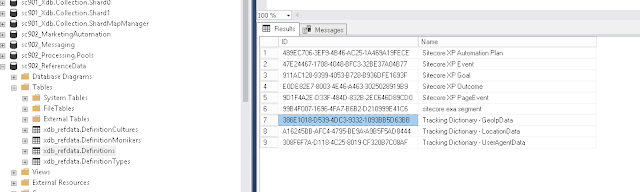
By using SQL Server Management Studio, and opening up the ReferenceData database's DefinitionTypes table, you can see the different types of reference data that is being stored. The GeoIp data type name as you can see below, is called "Tracking Dictionary - GeoIpData".


By looking at the Definitions table, you can see that the data is stored as a Binary data type:


The following SQL Query will return the top 100 GeoIP reference data results:

1
2
3
4
SELECT TOP 100 [xdb_refdata].[DefinitionTypes].Name, [xdb_refdata].[Definitions].Data, [xdb_refdata].[Definitions].IsActive, [xdb_refdata].[Definitions].LastModified, [xdb_refdata].[Definitions].Version
FROM [xdb_refdata].[Definitions]
INNER JOIN [xdb_refdata].[DefinitionTypes] ON [xdb_refdata].[DefinitionTypes].ID = [xdb_refdata].[Definitions].TypeID
WHERE [xdb_refdata].[DefinitionTypes].Name = 'Tracking Dictionary - GeoIpData'


Changes to the GeoIpManager class

Finally, I wanted to provide a glimpse of the changes in the GeoIpManager class that I referenced in my previous post.

By comparing the 8.x version of the GeoIpManager code to 9, you can see the usage of the KnownDataDictionaries.GeoIPs dictionary instead of the Tracker.Dictionaries.GeoIpData (ContactLocation class) from 8.x:


Final Words

I hope that this information helps developers understand more about Reference Data and the updated GeoIP Lookup Flow in Sitecore 9.

As always, feel free to comment or reach me on Slack or Twitter if you have any questions.


Thursday, August 16, 2018

Sitecore GeoIP - What Is Happening Under The Hood In 8.x?

Standard

Background

Most posts explain how Sitecore's GeoIP service works from a high-level point of view.

In this post, I intend to take the explanation a few steps deeper, so that developers can understand all the pieces that make this process work. The goal is to arm developers with the necessary details to successfully troubleshoot a problem if one arises.


Visitor Interaction - Start of visitor's session

  • Visitor visits Sitecore website, and this is regarded as a new interaction. Sitecore's definition of an interaction is ".. any point at which a contact interfaces with a brand, either online or offline". In our case, this is a new visitor session on the website.

  • Sitecore runs the CreateVisits pipeline. Within this pipeline, there is a processor called UpdateGeoIpData that fires a method called GeoIpManager.GetGeoIpData within Sitecore.Analytics.Tracking.CurrentVisitContext that initiates the GeoIP lookup for the visitor's interaction.

  • Within the GeoIP lookup logic, Sitecore will use the visitor's IP address to generate a unique identifier (GUID) based on the visitor's IP address. Eg. 192.168.1.100 => fd747022-dd48-b1ca-1312-eb4ba55030b2. 

NOTE: Sitecore performs all GeoIP lookups using this unique identifier. You can see this id by looking inside your MongoDB's GeoIPs collection. The field is named _id and this is the unique naming convention that MongoDB uses across all of its content. See my previous post for a snapshot.

  • Sitecore performs a GeoIP data lookup in memory cache.

  • If the GeoIP data IS in memory cache, then it will attach it to the visitor's interaction.

  • If the GeoIP data IS NOT in memory cache, it performs a GeoIP lookup in the MongoDB Analytics database's GeoIps collection.

  • If the GeoIP data IS in the MongoDB Analytics database's GeoIps collection, it attaches it to the visitor's interaction and stores the result in memory cache.

  • If the GeoIP data IS NOT in the GeoIps collection, it performs a lookup using the Sitecore Geolocation service and stores the result in memory cache and attaches it to the visitor's interaction.

NOTE: After a successful lookup, the GeoIP data is stored in the Tracker.Current.Interaction.GeoData (ContactLocation class)

GeoIP Data Cache

  • When the GeoIP data is obtained, it is added to a dictionary object that is part of the Sitecore Tracker so that it can be referenced via the Tracker.Current.Interaction.GeoData (shown above).

  • The odd thing that I noticed was that the cache expiration was set to 10 seconds (by default)
          Code reference:
          Sitecore.Analytics.Data.Dictionaries.TrackingDictionary
          private readonly TimeSpan defaultCacheExpirationTimeout = TimeSpan.FromSeconds(10.0);

GeoIP Data - End of visitor's session

  • At the end of the visitor's interaction / session, Sitecore will run the CommitSession pipeline.

  • Like the CreateVisits pipeline, there is a processor called UpdateGeoIpData that fires a method called GeoIpManager.GetGeoIpData (with the exact same code as in the CreateVisits pipeline). This initiates the GeoIP lookup flow once again (Cache / MongoDB / GeoIP Service).

  • Seems like the intention here is to confirm the visitor's GeoData before storing the data in MongoDB that will ultimately make it's way to the reporting database.

More To Come

Next, I intend to dig into Sitecore's GeoIP code for the 9.x series, and talk about the differences identified in that implementation.

Friday, July 27, 2018

Sitecore xDB - GeoIP and Contention Dynamics in MongoDB

Standard

Background

In my previous post, I discussed how our team has been diligently working to alleviate pressure on the our servers and MongoDB, on a high-traffic client's Sitecore Commerce site.

We use mLab to host our Experience Database, and while monitoring the telemetry of cluster, we noticed a series of contention indicators related to the increased number of queries and connections during high-traffic surges during the day.

In our scenario, our client's site has a lunchtime traffic surge between 11am and 3pm every day.

Contention Dynamics

Overall, our MongoDB was not being over-taxed in terms of overall capacity, as we were not using up all the RAM and CPU, but the telemetry charts did show what looked like pretty clear contention.

We noticed a certain pattern and volume in the site's traffic that lead to contention dynamics on our MongoDB nodes. The contention would eventually start to affect the Sitecore Content Delivery servers, which were obviously also dealing with that day’s peak load of web lunchtime traffic.

We were seeing a surge in connections with data reads (as reflected in MongoDB metric) such as the count of Queries (Operations Per Second) and the Returned documents count (Docs Affected Per Second). This was leading to a high degree of contention, as reflected in various other MongoDB metrics (CPU time, queues, disk I/O, page faults).


Our initial theory supported the idea the root cause of this contention in MongoDB was caused by high volume of lunchtime traffic in Sitecore, but in an indirect way.

GeoIP and MongoDB

Having troubleshooted Sitecore's GeoIP service before, I had a pretty good understanding of the flow.

If you need some insight, I suggest reading Grant Killian's post: https://grantkillian.wordpress.com/2015/03/09/geoip-resolution-for-sitecore-explained

In summary, the flow looks like this:
  • Visitor visits Sitecore website
  • Sitecore performs a GeoIP information lookup from the memory cache using the visitor's IP address
  • If the GeoIP information IS in memory cache then it uses it in the visitor's interaction
  • If the GeoIP information IS NOT in memory cache, it performs a GeoIP lookup in the MongoDB Analytics database's GeoIps collection
  • If the GeoIP information IS in the MongoDB Analytics database's GeoIps collection, it uses it in the visitor's interaction and stores the result in memory cache
  • If the GeoIP information IS NOT in the GeoIps collection, it performs a lookup using the Sitecore Geolocation service and stores the result in memory and uses it in the visitor's interaction

Our high-traffic site makes heavy use of GeoIP, as the Home Page is personalized based on the visitor's location and local time. 

There had to be a correlation between the high-traffic, GeoIP and the activity we were seeing on our MongoDB cluster. 

The item that stood out at me was the highlight above - the GeoIP lookup against the MongoDB Analytics GeoIps collection.


Running a record count query against the GeoIps collection, we discovered that it contained 7.4 million records! This confirmed our theory that the MongoDB GeoIp collection was heavily populated and being used for the lookups to hydrate the visitor's interaction and memory cache.

As a side note, if you crack open the interaction collection, you can see how Sitecore ties the GeoIP data from the lookup to the visitor's interaction (this is old news):


GeoIP Cache Settings

After digging into the code, we discovered that Sitecore's GeoIP service uses the cache called LegacyLocationList to store the GeoIP lookup data after is has been returned from either MongoDB or the GeoLocation service.

The naming of the cache is what caught us by surprise. One would think that a "legacy" cache would no longer be used.

If you crack open the Sitecore.CES.GeoIp.LegacyLocation.dll with your favorite .NET Decompiler  and you will see the following:


We started monitoring this legacy location cache closely, and discovered that it was in fact hitting capacity and clearing frequently during our lunchtime traffic surge. This had a direct relationship with the contention we were seeing on our MongoDB nodes during that period of time.

It was obvious to us at this point, that the 12MB default size of this cache was not enough to handle all that GeoIP lookup data!


GeoIP Cache Size Updates and Results

Our team decided to increase the LegacyLocationList cache size to 20MB via a simple patch update:

 <setting name="CES.GeoIp.LegacyLocation.Caching.LegacyLocationListCacheSize">  
     <patch:attribute name="value">20MB</patch:attribute>  
 </setting>  
After our deployment, we monitored the cluster's telemetry closely. It was apparent by looking at the connection count, that there was an instant improvement resulting from the increased cache size.

Before the deployment of the cache setting change (LegacyLocationList cache default set to 12MB), we were averaging around 400 connections during the traffic surge.


After the deployment (increase the LegacyLocationList cache size to 20MB), our connection count was only averaging around 200!


Over the course of several weeks, our team was happy to report that during our lunchtime traffic surges, there was a dramatic reduction in connections with Data Reads, Operations Per Second, Docs Affected Per Second, CPU time, queues, disk I/O, page faults on our MongoDB cluster.

Another positive step towards our overall goal of improving MongoDB connection management on our Content Delivery servers.

Final Note

Another special thanks to Dan Read (Arke), Alex Mayle (Sogeti) for their contributions.

Monday, June 20, 2016

Sitecore's IP Geolocation Service - Working with the Missing Area Code, Missing Time Zone and Testing GeoIP Lookups

Standard

Background

My current projects make heavy use of GeoIP personalization, and as a result, I have had the opportunity to dig deep into Sitecore's IP Geolocation Service features, uncovering the gaps and figuring out ways to get around them.

If you need help setting up the Geolocation Service, make sure you check out my post: http://sitecoreart.martinrayenglish.com/2015/08/setting-up-sitecores-geolocation-lookup.html

The Missing Area Code

Sitecore gives you a really nice set of rules to work with once you have the service enabled:


Looking above, you will see that the first rule is based on a visitor's area code.

Unfortunately, this rule doesn't work. After decompiling the GeoIP assembly, I was able to determine that the AreaCode property of the WhoIs object is never set in the MapGeoIpResponse processor:


And the rule that is supposed to use the area code:


So, make sure that you use the "postal code" condition if you plan on doing this type of personalization, and not the "area code" one.

The Missing Time Zone

One of my projects has a requirement around the ability to personalize based on the time of day.

When talking about this over lunch with some fellow Sitecore geeks, I got the "..doesn't Sitecore do that out of the box?" response.

At first thought, this seemed like a valid response, as Sitecore advertises that their IP Geolocation Service has the ability to identify a visitor's time zone.

Well, we know that there aren't any time-based rules shown by the Geolocation ruleset above, but if we have the person's time zone, we could at least use this information to conjure up some custom condition that will allow us to do this type of personalization.

Focusing on the GeoIpResponseProcessor again, you will notice that there is no time zone property on the WhoIs object. So, it's clear that we actually don't have a time zone to use.

After digging in a bit further, and confirming a few things with Sitecore support, I was able to determine that the JSON response from Sitecore's Geolocation service does actually contain the time zone information:


So, why wouldn't they make this available via the WhoIs object and API?

This seems a bit odd.

I registered a wish with my support ticket, so hopefully we will see this in a future release. Until then, we have to write a bit of code to peel off the value so that we can use it in our customization.

Time Zone Fun

Getting the Time Zone

In order to get that time zone value from the service, I had to create a custom processor to grab the raw value from service response.

Processor


Patch Configuration


Converting Olson to Windows Time

As you can see above, time zones from the service are in IANA time zone format (also known as Olson) as described here: https://dev.maxmind.com/faq/how-can-i-determine-the-timezone-of-a-website-visitor/

So the next order of business was to take the Olson time zone ID and convert it to a Windows time zone ID so that when I was ready to perform the local time calculation, it would be fairly easy using the .NET Framework's TimeZoneInfo class.

After a quick Google, I came across this Stack Overflow article that I based my conversion helper method on:
http://stackoverflow.com/questions/5996320/net-timezoneinfo-from-olson-time-zone

With these pieces on place, I had everything I needed to build out my time-based personalization rules!


Bonus: Testing GeoIP Lookups

To make GeoIP Lookup testing easy, I created a processor that injects a mock ip address obtained from a setting, so you can verify that your dependent rules work as expected.

Note: There is a dated module called Geo IP Tester on the Marketplace, but unfortunately it isn't compatible with Sitecore 8.x due to the changes in the API.

Processor


Patch Configuration


Monday, August 31, 2015

Setting up Sitecore's Geolocation Lookup Services in a Production Environment

Standard

Background

We have been working with Sitecore’s Business Optimization Services (SBOS) team for quite some time, helping one of our client's stretch the legs of the Experience Platform.

One of the tasks on the list included setting up Sitecore's Geolocation Service so that we could personalize based on the visitor's location. The SBOS team had some pretty slick rules set up on the Home Page of a site, where they switched out carousel slides and marketing content spots based on the visitor's location.


Sitecore Geolocation Lookup Service and MaxMind

There have been some changes with regards to the Geolocation / MaxMind set up because Sitecore launched IP Geolocation directly to their customers via the Sitecore App Center instead of going through MaxMind to use their service. Here is a link to Sitecore's documentation site that contains set up instructions, and how to migrate from MaxMind if purchased and have been working directly with them in the past:
https://doc.sitecore.net/Sitecore%20Experience%20Platform/Analytics/Setting%20up%20Sitecore%20IP%20Geolocation

Setup

After sifting through the documentation, we highlighted the following steps that needed to be completed in order to get up and running, and validate that things were indeed working:

  1. Download and install the Geolocation client package from https://dev.sitecore.net/Downloads.aspx
  2. Enable ALL configuration files in the CES folder
  3. Whitelist geoIp-ces.cloud.sitecore.net and discovery-ces.cloud.sitecore.net
  4. Test personalization
NOTE: Depending on your firewall, you may only have the option to whitelist by IP address. If this applies to you, you will need obtain the list of Azure IP addresses from the following link: Azure Datacenter IP Address Ranges. This is what happened to us, and I call tell you that the list is looooooooooooooong!!! Your network guy or gal will hate you!

Unfortunately for us, there was one piece of configuration that isn't documented. It so happened to be one of the most important pieces.

You will know what I am referring to as you read further along.

Testing

With all the pieces in place, we started testing our personalization.

Things worked beautiful on our Staging Server, but Production was a non-starter! So, as good detectives, we started our troubleshooting by looking at the differences between Staging and Production.

Load Balancer / Firewall / CDN woes

Our client uses Incapsula to protect their production websites. It does a great job protecting and caching their various site's to ensure optimal performance. It has however given us some grey hairs in the past when dealing with Sitecore's Federated Experience Manager. But, that's a story for another time.

The Incapsula CDN was the main difference between Staging and Production.

After running several tests with Fiddler and capturing packets using Wireshark, we were able to the determine that the Geolocation service was not obtaining the visitor's actual IP address. Instead, it was passing along Incapsula's IP address.

The reason for this was identified in the CreateVisitProcessor within the CreateVisits analytics pipeline. As you can see below, it was passing over the Request.UserHostAddress value.


This doesn't work when you are behind a load balance or proxy, as described by this article: http://stackoverflow.com/questions/200527/userhostaddress-gives-wrong-ips

Digging further, we discovered another interesting processor in the CreateVisits pipeline called XForwardedFor. Aha! As we know; the "...header field is a de facto standard for identifying the originating IP address of a client connecting to a web server through an HTTP proxy or load balancer."

Looking at the code below, you will notice that it's pulling in a setting, and if it's not empty, it is used as the key to obtain the value from the request's header NameValueCollection.


After digging around, and talking to support, we discovered the config file named Sitecore.Analytics.Tracking.config and setting below:

 <!-- ANALYTICS FORWARDED REQUEST HTTP HEADER  
    Specifies the name of an HTTP header variable containing the IP address of the webclient.  
    Only for use behind load-balancers that mask web client IP addresses from webservers.  
    IMPORTANT: If this setting is used incorrectly, it allows IP address spoofing.  
    Typical values are "X-Forwarded-For" and "X-Real-IP".  
    Default value: "" (disabled)  
 -->  
 <setting name="Analytics.ForwardedRequestHttpHeader" value="" />  

Light at the end of the tunnel

After setting the value to "X-Forwarded-For" as shown below, the magical Geolocation based personalization started working like a champ!

<setting name="Analytics.ForwardedRequestHttpHeader" value="X-Forwarded-For" />

NOTE: We discovered that casing matters when setting the value. "X-FORWARDED-FOR" will NOT work. It needs to be set exactly like I have it above. For more information on this, you can read this Stack Overflow article:
http://stackoverflow.com/questions/11616964/is-request-headersheader-name-in-asp-net-case-sensitive


I hope that this information helps make your Sitecore IP Geolocation configuration go smoothly for your environment!

A special thanks to Kyle Heon from Sitecore for his support through this process.